 As a business owner, your website is a critical asset, and having a reliable backup is your safety net. We understand you might have installed a popular backup plugin for peace of mind, but at WP Sparks, we already have you covered with a superior, server-side system.
In fact, keeping backups on your website using plugins like All-in-One WP Migration or Duplicator Pro is actually one of the fastest ways to max out your hosting storage and can even put your website data at risk!
Here is everything you need to know about backups at WP Sparks and why it’s time to let us handle the heavy lifting.
🛡️ Your Backup is Our Job: The WP Sparks Difference
At WP Sparks, we don’t rely on your website’s plugins for backups. Our system operates a daily, server-side backup of your entire website.
What does “Daily, Server-Side Backup” mean?
-
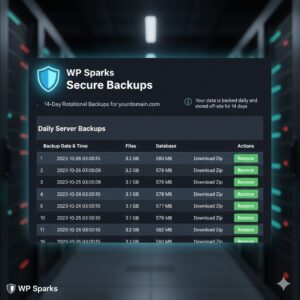
Daily: Your entire website – all your files, images, and database information – is automatically backed up every 24 hours. You don’t have to lift a finger or schedule anything.
-
Server-Side: The backup process happens on our dedicated backup infrastructure, separate from your live website. This is the crucial difference.
-
14-Day Rotational Backup: We store the last 14 days of daily backups. If you discover a problem today, you can roll back your site to any point in the last two weeks.
Why is a Server-Side Backup Safer and Better?
-
It Saves Your Storage: Your website files already take up space. Every time a plugin makes a backup and saves it on your website, it’s essentially doubling your file size. Over time, these files pile up, consuming more and more of your premium hosting storage allowance. Our backups are stored off-site, so they do not count against your hosting storage limit.
-
It Protects Against Corruption: If your website files are compromised (e.g., a hacking attempt or a critical file error), any backup stored within that compromised website is also at risk. Because our backups are stored on a separate, protected server, they remain safe even if your live site runs into trouble.
-
Easy Access When You Need It: If you ever need to access or restore a backup, you have two simple options:
-
Need a Restore? Just contact the WP Sparks team, and we’ll handle the restoration for you, quickly and accurately.
-
Need a Local Copy? You can easily log into your hosting control panel and download a compressed (zip) copy of your website files from our secure storage.
-
The takeaway for you: Because we provide robust, daily, off-site backups, you do not need – and we strongly recommend against – using additional backup plugins that store files on your hosting account.
🗑️ Time to Clean Up: Finding and Removing Duplicate Backups
If you have a backup plugin installed, it’s likely creating large, unnecessary files that are eating up your disk space. We’ve drafted two specific guides below to help you clean up your hosting account and remove those redundant backup files.
Please review your installed plugins and use the appropriate guide for a clean, secure, and lighter website!